You are seeing this message because you are using the Internet Explorer web browser. Internet Explorer has not been updated with new features since the release of Windows 10 in July 2015, so it doesn't support the modern standards that our website uses. We recommend switching to Google Chrome, Mozilla Firefox, or Microsoft Edge, all of which our website is tested with.
Once you become a member of NAHA at a Level 1, 2, or 3, member you will be required to obtain Continuing Education Credits to remain a member in good standing. Every two years these credits will be audited by NAHA staff to make sure they meet the requirements listed below, along with the total hours required for that membership level (Level 1 = 10 hours, Level 2 = 20 hours, Level 3 = 30 hours).
To record your CE credit hours members will need to:
• Log into your member account home page
• Locate the Manage CEs for your NAHA Membership Subscription link to click.
Example:

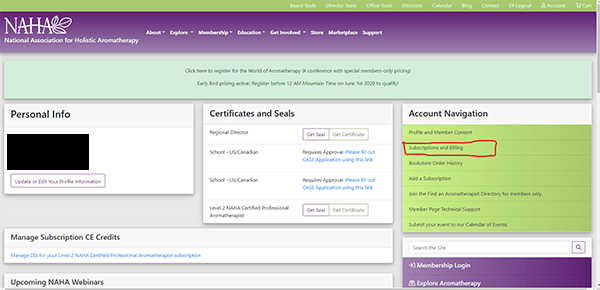
• If you do not see this link it might be the first time that you are entering a Continuing Education credit. If so, click on Subscriptions and Billing from the Account Navigation box.

• Click on the manage CE hours link in the Memberships column.

• Click the purple Add button found on the lower right of the CE Records box.
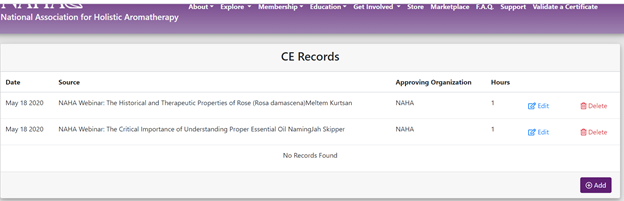
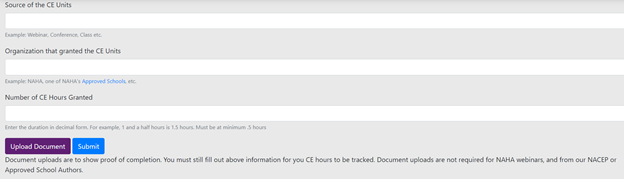
• Be prepared to provide The Source of CE Units. The source would include the educational medium, title, & presenter.
Educational Medium types: Teleseminar, Webinar, Conference, Class, Retreat.
Title: Example: Scientific Research for Aromatherapists
Presenter: Example: Dr. Jessie Hawkins
The full example for the source should look like this -> Webinar: Scientific Research for Aromatherapists with Dr. Jessie Hawkins
• Please offer us the name of the organization that granted the CE Units.Example: NAHA, NAHA Approved School, NACEP etc.
• Be prepared to enter the Number of CE Hours Granted. (This information is usually found on your certificate of completion or offered as information with your Webinar)
• Upload necessary documents for proof of completion. *Certificates of coursework offered by a NACEP, or an Approved School Educator is necessary to validate proof of completion.
Once the a NAHA Webinar or Teleseminar is completed you would be able to go to your NAHA account page. Scrool down to Previous NAHA Webinars and look up the title of the webinar you just completed to click and save a copy of your CE Letter.
• When you press upload, you can either click to add the file in question. Once this is accomplished you would get a message that NAHA will be notified about your upload.
• Please press the back arrow button to go back to your last page. Be sure to press submit to save the information you entered about your CE Credits.
*NOTE: If you do not see your Manage CE Subscription hours link & this is the first time you are logging a Continuing Education credit, from the Account Navigation section, click on Subscriptions and Billing. Then click on Manage CE Hours.
You may be asked to include a copy of your Certificate of completion. This certificate should your name, date of completion, title of the continuing education class, webinar, teleseminar, podcast, event, or conference.
How to add a NAHA Membership
1. Click Signup in the upper right corner.
2. Fill out the registration form on the right, in it's entirety.
3. Log in to your new account.
4. Click Add a subscription from the Account Navigation menu. Please subscribe to the plan appropriate for your region and certification level.
5. Submit your payment and or use the coupon code provide by your school.
6. Submit your membership application (only for levels 1, 2, 3, or bussiness).
*If you still have additional questions or concerns please email info@naha.org
How Do I Renew My NAHA Membership?
Your NAHA Membership should renew automatically. You will be informed via email when this renewal occurs. If the payment does not go through, you will be notified, and the system will try again in a few days. The system will attempt to bill for up to 30 days. After which your membership will expire on the 31st day. Once your membership has expired, the only way to renew is to add a new membership from your account page. To do this please:
1. Log into your current member account.
2. Make sure you are on your account home page by clicking “account” in the top right of your screen.
3. Locate the Account Navigation Panel and select the Add a Subscription option.
4. Choose your membership level and make your payment.
*Note: If you were previously registered as a Level 1, 2, or 3 member then you will need to resubmit documents via the upload link on your member account home page. If you cannot find your previous records, please email our office at info@naha.org for assistance.
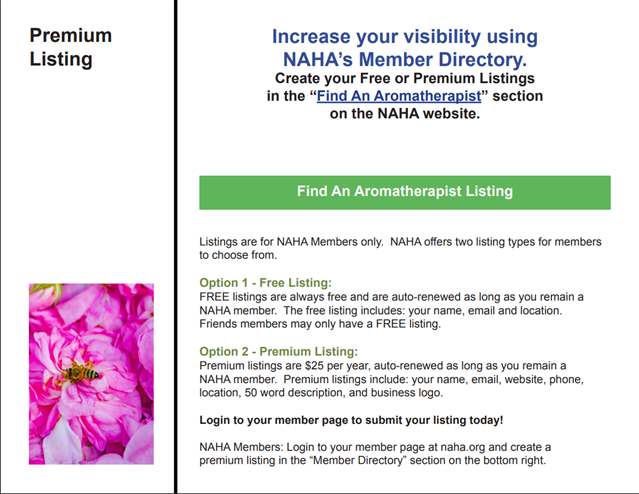
Joining our directory is easy! If you're a Level 2 Member or higher you are allowed to be discovered in our Find an Aromatherapist Directory so clients can search practicing aromatherapists, retailers, wholesalers, and the like, all in one convenient spot. Members can choose between a free directory listing, or paid annual listing, which includes extra features like social media highlights, company logo, and more!
Here's how to sign-up:
1. Log in to your member account
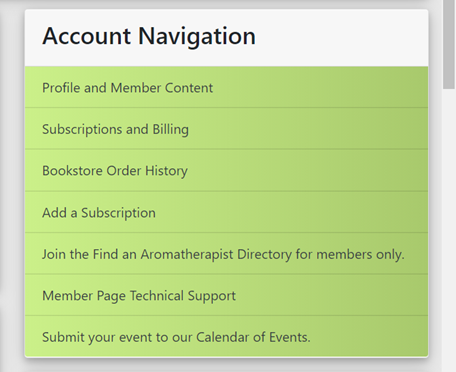
2. Locate the Join the Find an Aromatherapist Directory button in the account navigation panel (5th option down in the green box, on the right side of your computer screen).
3. Once you click on that and are redirected, locate the Directory Listing Subscription box and choose what option best suits your needs.
4. Please confirm subscription payment info. This applies to free directory listings as well, as our system requires you to have a card on file to create this subscription.
5. Follow the next steps below to finish setting up your listing.
Creating your listing for the Find an Aromatherapist directory is easy if you follow these steps:
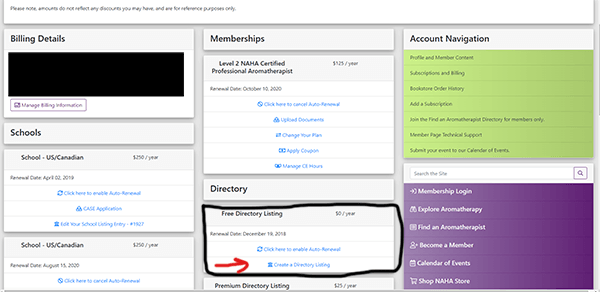
1. Log in to your account, and choose Subscriptions and Billing from the Account Navigation menu on the right (circled in Red in image)

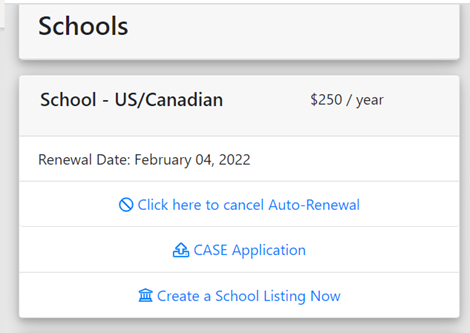
2. Locate the box on this page marked either 'Free Directory Listing' or 'Premium Directory Listing' (Circled in black in the image) and choose the option to Create a Directory Listing (Red Arrow in image)
For Premium Listings has been selected please include your social media handles, company logo, & description availabel for this listing.
Logo: Please do not upload a logo file that is more than 1 Megabyte or 1024 Kilobytes. Logo sizes typically range from 900 x 900 px to 200 x 200 px. Thank you!
Description: 500 characters or 1 paragraph.
*NOTE: If you still experience any issues, please email info@naha.org.
To cancel your membership please first, log in to your member account. From your member account home page please locate the 'Subscriptions and Billing' option in the green account navigation box.
Click on that option, and once your page is redirected you will be able to see your current membership subscription box under the 'memberships' section on that page. In that box will be a link that says "click here to _______ auto-renewal."
If the option is to 'enable' auto-renew then you will not be automatically charge on the date listed above.
If the option is to 'cancel' auto-renewal then you will need to select that link to turn off your current renewal. You will have access to your membership benefits until that listed date.
*NOTE: If you have forgotten to turn off your auto-renewal and it is within a 30-day window of the original charge you may email info@naha.org for a refund. Please include your Member I.D. in the email for reference.
1. Log in to your member account
2. Locate the Subscriptions and Billing button in the account navigation box
3. Locate the directory listing box
4. Locate the link to "edit listing"
If you experience any issues with editing or updating your listing please email info@naha.org with the details you wish to change.
1. Log in to your current membership account.
2. Locate the Subscriptions and Billing option in the green box labeled "Account Navigation"
3. Locate the Membership Box with your current membership level listed.
4. Locate the blue Change Your Plan link option in the box.
5. Select the level with which you are changing your plan to.
6. Confirm payment (note* difference in payment during current membership will be pro-rated).
7. If upgrading to a Level 1, 2, or 3 plan please wait for emailed instructions of how to finish application process.
Renewals are processed automatically on the day that is displayed on your Subscriptions and Billing page. If auto-renew is enabled, the card associated with that account and subscription is processed. If a coupon code is entered any day before that renewal is processed it will automatically be applied to that subscription when it is renewed. To apply the coupon code follow these steps:
1. Log-in to your Member Account.
2. Locate the Subscriptions and Billing link in the green Account Navigation box.
3. Once redirected, locate your membership subscription, and check to make sure auto-renew is enabled.
4. Locate Apply Coupon Code Link
5. Click Save.
You will get an email when your subscription renews reflecting the total minus the coupon code amount. If this is not accurate please email info@naha.org for assistance.
Log in to your membership account.
Select Subscriptions and Billing from the green Account Navigation panel box on the right-hand side of your screen.
Locate Billing Details box located on left side of your screen and click the button that says Manage Billing Information.
Add your new card.
Prompt new card to Set As Default.
You can then Delete the old card from your account.
*Note: If you want to change the expiration date you will still need to enter it as a new card.
Sign into your account
From your account navigation links click subscriptions and billing.
Click create a school listing now.

Fill out all areas of the school listings page. (This includes the yes/no section found on the right side of this document and a copy of your logo.)
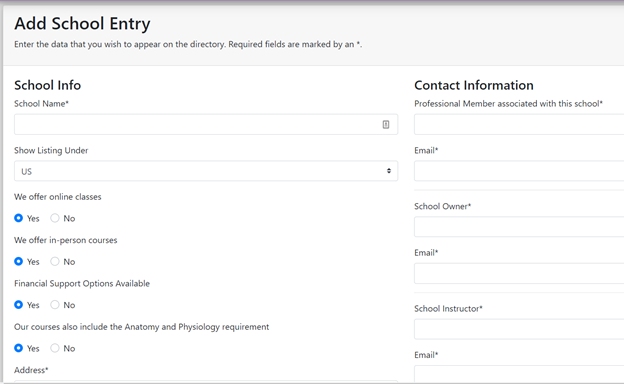
You can now go to to look up your approved school!
Both levels can create their own find an aromatherapist listing, have discount opportunities, free calendar of events postings, professional & Product Liability Insurance Options. Also, after a year of membership and teaching aromatherapy, Level 2 and 3 members are eligible to apply to become a NAHA approved school, NAHA Approved Continuing Education Provider, and or Regional director.
More information about becoming a NAHA Approved School: https://naha.org/education/become-an-approved-school/
More information about NAHA Educational Standards: https://naha.org/education/standards/
More information about becoming a NAHA Approved Educational Provider: https://naha.org/education/become-an-approved-continuing-education-provider/
More information about becoming a Regional Director: https://naha.org/get-involved/become-a-naha-director/
Have attended and graduated from a NAHA Approved Level 1 aromatherapy training program, minimum 50 hours* or the equivalent.
Description found here: Become A Member Level 1
Standards found here: Educational Standards
Must show proof of completion of Anatomy & Physiology 1 from an accredited institution, or the equivalent class taken in addition to the Level 1 Course, from a NAHA approved school. If you are an existing health professional you will need to upload a copy of your degree certificate, current medical licensing, or unofficial transcripts for proof. Anatomy & Physiology Level 1 is a 3-4 credit undergraduate class which typically covers: Tissue & The Integumentary System; Skeleton, Joints & The Skeletal System; Muscle, Muscle Tissue & The Muscular System; Nervous Tissue & The Central Nervous System, The Peripheral Nervous System, The Autonomic Nervous System; The Endocrine System; Cellular Structure & Types, Basic Chemistry. Many universities and colleges offer this course in classrooms and online. 1 college credit = 15-16 classroom hours, or self-paced online which can often be completed more quickly.
Professional Business Policy, website, social media, and written materials must not contain promotion of unsafe and/or contraindicated use of essential oils and aromatherapy techniques.
*NOTE:This level of membership requires continuing education credits to remain active, in good standing. From the start date of NAHA Level 1 subscription members will be required to provide proof of completion of 5 NAHA approved continuing education hours (CEs) per year, or 10 CEs every 2 years. To learn more about membership renewal protocol please see: https://naha.org/membership/renew/
In Short : For Level 1: NAHA Certified Aromatherapist (NCA)® upload documents please have:
Certificate of Completion: If you attended a NAHA Approved school, upload your certificate here. (Up to 2 files total)
Detailed Course Outline: If you attended a non-approved school, upload a copy of your course syllabus here. (Up to 2 files total)
Anatomy and Physiology: Acceptable Documents: Certificate of Completion for additional A &P course provided by NAHA approved school, Syllabus outlining A & P content covered as a requirement upon Completion of NAHA Approved School's course, Diploma or Certification of healthcare profession, Transcripts with coursework and proof of passing grade listed from an Accredited Institution. (Up to 1 file total)
*For Best Results: Please reduce the file size of each document before upload. Accepted File types are pdf, image files, & Word. We only ask that each document provided be legible and, in a size, large enough to decipher. Please assure that all uploaded file or Documents are 300 kilobytes to 1 megabyte, or less.
Have attended and graduated from a NAHA approved Level 2 aromatherapy training program, minimum 200 hours**, or the equivalent.
Description found here: https://naha.org/membership/become-a-member/#level2
Standards found here: https://naha.org/education/standards/
Must show proof of completion of Anatomy & Physiology 1 from an accredited institution, or the equivalent class taken in addition to the Level 1 Course, from a NAHA approved school. If you are an existing health professional you will need to upload a copy of your degree certificate, current medical licensing, or unofficial transcripts for proof. Anatomy & Physiology Level 1 is a 3-4 credit undergraduate class which typically covers: Tissue & The Integumentary System; Skeleton, Joints & The Skeletal System; Muscle, Muscle Tissue & The Muscular System; Nervous Tissue & The Central Nervous System, The Peripheral Nervous System, The Autonomic Nervous System; The Endocrine System; Cellular Structure & Types, Basic Chemistry. Many universities and colleges offer this course in classrooms and online. 1 college credit = 15-16 classroom hours, or self-paced online which can often be completed more quickly.
Professional Business Policy, website, social media, and written materials must not contain promotion of unsafe and/or contraindicated use of essential oils and aromatherapy techniques.
*Note: This level of membership requires continuing education credits to remain active, in good standing. From start date of NAHA Level 2 subscription members will be required to provide proof of completion of 10 NAHA approved continuing education hours (CEs) per year, or 20 CEs every 2 years.
To learn more about membership renewal protocol please see: https://naha.org/membership/renew/
In Short : For Level 2: NAHA Certified Professional Aromatherapist (NCPA)® upload documents please have:
Certificate of completion: If you attended a NAHA Approved school, upload your certificate here. (Up to 2 files total)
Detailed Course Outline: If you attended a non-approved school, upload a copy of your course syllabus here. (Up to 2 files total)
Anatomy and Physiology: Acceptable Documents: Certificate of Completion for additional A &P course provided by NAHA approved school, Syllabus outlining A & P content covered as a requirement upon Completion of NAHA Approved School's course, Diploma or Certification of healthcare profession, Transcripts with coursework and proof of passing grade listed from an Accredited Institution. (Up to 1 file total)
*For Best Results: Please reduce the file size of each document before upload. Accepted File types are pdf, image files, & Word. We only ask that each document provided be legible and, in a size, large enough to decipher. Please assure that all uploaded file or Documents are 300 kilobytes to 1 megabyte, or less.
Have attended and graduated from a NAHA approved Level 3 Aromatherapy Training Program, minimum 300 hours**, or the equivalent.
Description found here: https://naha.org/membership/become-a-member/#level3
Standards found here: https://naha.org/education/standards/
Minimum of 1 year of direct clinical Aromatherapy experience. Clinical experience can be obtained by working in a Holistic Healing Center, Integrative Medicine Facility or Traditional Medical Center that utilizes aromatherapy as a healing modality. Hospital work is not required but may be counted toward clinical experience if aromatherapy is used as a healing modality. Proof of clinical experience documentation may be in the form of typed list of clinical aromatherapy hours on professional letterhead and signed by clinic/center coordinator, and or the same list from your private consulting business.
Must show proof of completion of Anatomy & Physiology 1 & Advanced Pathophysiology course from an accredited institution, or the equivalent class taken in addition to the Level 3 Course, from a NAHA approved school. Anatomy & Physiology Level 1 is a 3-4 credit undergraduate class which typically covers: Tissue & The Integumentary System; Skeleton, Joints & The Skeletal System; Muscle, Muscle Tissue & The Muscular System; Nervous Tissue & The Central Nervous System, The Peripheral Nervous System, The Autonomic Nervous System; The Endocrine System; Cellular Structure & Types, Basic Chemistry. Advanced Pathophysiology is a 3-4 credit graduate level class which typically advances knowledge of anatomy and physiology while explaining the mechanisms of diseases and pathophysiological conditions affecting the integumentary system, the circulatory system, the reproductive system, the musculoskeletal system, the lymphatic/immune system, the endocrine system, the nervous system, the urinary system, and the digestive system. Many universities and colleges offer this course in classrooms and online. If you are an existing health professional, you will need to upload a copy of your unofficial transcripts for proof.
Professional Business policy, website, social media, and written materials must not contain: promotion of unsafe and/or contraindicated use of essential oils and aromatherapy techniques.
*NOTE: This level of membership requires continuing education credits to remain active, in good standing. From the start date of NAHA Level 3 subscription members will be required to provide proof of completion of 15 NAHA approved continuing education hours (CEs) per year, or 30 CEs every 2 years. To learn more about membership renewal protocol please see: https://naha.org/membership/renew/
In Short : For Level 3 NAHA Certified Clinical Aromatherapist (NCCA)® upload documents please have:
Certificate of completion: If you attended a NAHA Approved school, upload your certificate here. (Up to 2 files total)
Detailed Course Outline: If you attended a non-approved school, upload a copy of your course syllabus here. (Up to 2 files total)
Anatomy and Physiology: Acceptable Documents: Certificate of Completion for additional A &P course provided by NAHA approved school, Syllabus outlining A & P content covered as a requirement upon Completion of NAHA Approved School's course, Diploma or Certification of healthcare profession, Transcripts with coursework and proof of passing grade listed from an Accredited Institution. (Up to 1 file total)
Pathobiology Course Work: If applying for a Level 3 Certification please upload proof of Pathobiology coursework, (i.e. medical professional degree or certification or transcripts which include coursework and proof of passing grade). (Up to 2 files total)
Clinical Experience Documentation: LEVEL 3 ONLY: Clinical experience required for all Level 3 applications. Note: applications will be denied if there is no documentation uploaded. Acceptable documents include Typed, on professional letterhead, clinical hours earned, with inclusion of supervisor signature. OR, Proof of business license, copy of insurance coverage, and documentation detailing hours worked in a personal, clinical aromatherapy business. (Up to 2 files total)
*For Best Results: Please reduce the file size of each document before upload. Accepted File types are pdf, image files, & Word. We only ask that each document provided be legible and, in a size, large enough to decipher. Please assure that all uploaded file or Documents are 300 kilobytes to 1 megabyte, or less.
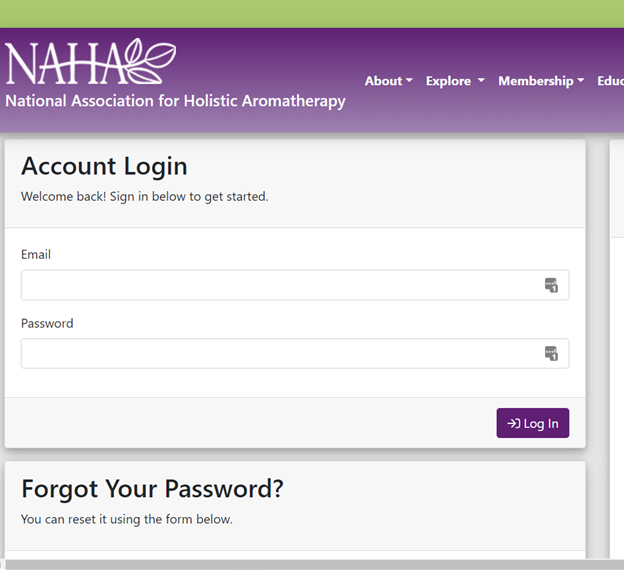
From naha.org click on Membership Login, found at the top right corner of your webpage.
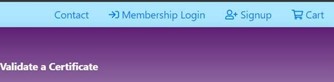
Fill out the email address and selected password. Then click Log In to gain access to your account information.
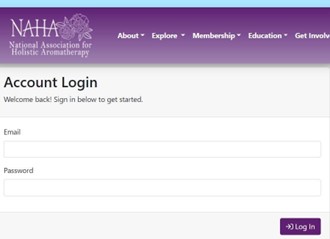
Forgot your password? Nothing to worry about. Simply scroll below account login, enter your email address, and click Reset Password.
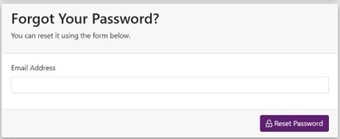
This will send a link to your email to set up a new password. When setting up a new password please be sure to write it down or save it to your preferred browser.
Once logged in look for the Account Navigation box to the right. Click on Subscriptions and Billing.
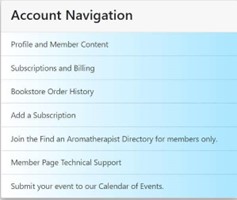
On the next page select the plan you are eligible for! Below we included links to help you decide what eligibility you fall into.
Eligibility for membership plans Click Here.
Eligibility for school plans Click Here.
Eligibility for NACEP plans Click Here.
Look for Certificate and Seals and click on Please complete the membership application.
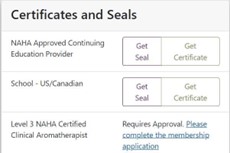
Please fill out all areas pertaining to your level. Once submitted an email will come from NAHA stating that your membership information has been received and to allow 3-5 business days for review. If you have additional questions or concerns, please email info@naha.org.
Log into your member account home page.
From Account Navigation click on Subscriptions and Billing.
Each subscription will either say click here to enable auto-renewal or click here to cancel auto-renewal.
For additional questions or concerns please email info@naha.org.
(Big thanks to google and the authors of each article!)
1. First check on file type .docx, .docx, .JPG, .PDF, or .png. This usually shows up at the end of each saved document name.
Example below
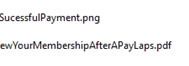
2. Based on the type of file you are working on here is a list of articles that will help you reduce the size of your file.
How to compress PDF's on an iPad. Click Here for Article
How to open ZIP files on your iPhone, iPad, or iPod touch. Click Here for Article
3 ways to Reduce PDF File Size:(File type PDF) Click Here for Article
How do I reduce the File Size of an image?(File types of JPG, GIF, & PNG) Click Here for Article
How To Reduce the file size of Microsoft Word. File type is docx(2 versions Office 2013 – 2016 vs Newer versions) Click Here for Article
*For Best Results: Please reduce the file size of each document before upload. Accepted File types are pdf, image files, & Word. We only ask that each document provided be legible and, in a size, large enough to decipher. Please assure that all uploaded file or Documents are 300 kilobytes to 1 megabyte, or less.
Active members have access to NAHA Webinars, Journals, Brochures & Ebooks!
1. Log into your naha account.
2. Scroll down to the webinars and the Journal listings are found on the right.
3. Click on the title of the NAHA Journal you desire!
4. Enjoy!
Our billing system does have a retry payment feature programmed to retry at 3 days then 5 days after each failed payment attempt.
1. Log into your naha account. https://naha.org/account
2. Click on updated and edit your profile information.
3. Update your email from the email field.
4. Put in your current password and click update profile.

To ensure that emails from "@naha.org" are delivered to your inbox instead of being marked as junk or spam, you can follow these general instructions:
1. Add "@naha.org" to Your Contacts or Safe Sender List:
- Open your email client or service provider (e.g., Gmail, Outlook, Yahoo Mail).
- Navigate to your Contacts or Address Book.
- Add a new contact or safe sender entry with the email address "@naha.org".
- Save the changes.
2. Mark Previous Emails from "@naha.org" as Not Spam:
- Check your spam or junk folder for any emails from "@naha.org".
- If you find any, mark them as "Not Spam" or "Not Junk".
- This action helps your email client or service learn that emails from "@naha.org" are not spam.
3. Create an Email Filter (if applicable):
- Some email services allow you to create filters or rules to manage incoming emails.
- Create a filter that automatically sends emails from "@naha.org" directly to your inbox.
- Consult your email service's documentation for specific instructions on setting up filters.
4. Check Email Settings:
- Review your email settings for any options related to spam or junk mail filtering.
- Adjust these settings to ensure that emails from "@naha.org" are not being filtered out.
5. Whitelist "@naha.org" Domains/IPs (for advanced users or system administrators):
- If you manage email servers or have advanced access to email settings, consider whitelisting the "@naha.org" domain or IP addresses.
- This ensures that emails from "@naha.org" are not blocked at the server level.
6. Contact Your Email Provider's Support:
- If you're still experiencing issues receiving emails from "@naha.org" despite taking the above steps, contact your email provider's support team.
- They may be able to assist you further in ensuring that emails from "@naha.org" are properly delivered to your inbox.
By following these steps, you should be able to prevent emails from "@naha.org" from being sent to your junk or spam folder and ensure they are delivered to your inbox.
How Can I Add My Event To Calendar Of Events?
*Note: When submitting the event calendar of events may go to an error page. Don't fret, you may need to click the referesh button a hand full of times to submit. Calendar of events must be approved to appear.
1. Log into your NAHA Account.

2. In your personal info box click Update or Edit your Profile Information.
3. Add, correct, or update your profile information.
4. Make sure you fill out your current password toward the bottom of your page before you click Update Profile.
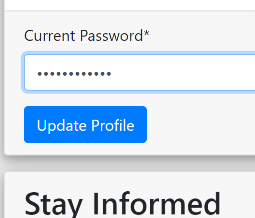
If you are still expiriencing problems updating your profile please email us at info@naha.org.
We are thrilled to hear that you are interested in growing your aromatherapy enterprise! If you are the one that will be teaching aromatherapy you would want to pursue no less than a level 2 or 3 education. Approved schools are found here: https://naha.org/education/approved-schools/
Even if a school is NAHA approved you want to make sure they have not made any changes in their curriculum that would hold you back from the level 2 or 3 standards found here: https://naha.org/education/standards/
Please review member requirements for Level 2 and Level 3 memberships: https://naha.org/membership/become-a-member/
This will tell you about becoming a continuing education provider: https://naha.org/education/become-an-approved-continuing-education-provider/
This will tell you about becoming a school: https://naha.org/education/become-an-approved-school/
Level 1 Benefits: https://naha.org/membership/become-a-member/#level1
Level 1 Requirements: https://naha.org/membership/become-a-member/#level1requirements
Level 2 Benefits: https://naha.org/membership/become-a-member/#level2
Level 2 Requirements: https://naha.org/membership/become-a-member/#level2requirements
Level 3 Benefits: https://naha.org/membership/become-a-member/#level3
Level 3 Requirements: https://naha.org/membership/become-a-member/#level3requirements
NAHA's Educational Standards: https://naha.org/education/standards/ & NAHA's Approved Schools: https://naha.org/education/approved-schools/
You can use this code: NAHANEW to get $10.00 USD off of your new subscription or membership.
*If you have additional questions please email info@naha.org.
Go to naha.org click on Membership Login.

You will see!

Scroll down to Forgot Your Password. Place your email address in the Email Address field and click on Reset Password. Instructions will tell you to check your email. Please don’t forget to check the trash, junk, and spam folders.
*If you need further information or assistance, please contact info@naha.org.
Here's a list of .gov websites for each U.S. state that you can use as a starting point to find information on aromatherapy. Not all states will have a specific page dedicated to aromatherapy, but you can explore related content under health, licensing, or regulatory sections.
Alabama
- Alabama Department of Public Health
Alaska
- Alaska Department of Health and Social Services
Arizona
- Arizona Department of Health Services
Arkansas
- Arkansas Department of Health
California
- California Department of Public Health
Colorado
- Colorado Department of Public Health and Environment
Connecticut
- Connecticut Department of Public Health
Delaware
- Delaware Division of Public Health
Florida
- Florida Department of Health
Georgia
- Georgia Department of Public Health
Hawaii
- Hawaii Department of Health
Idaho
- Idaho Department of Health and Welfare
Illinois
- Illinois Department of Public Health
Indiana
- Indiana State Department of Health
Iowa
- Iowa Department of Public Health
Kansas
- Kansas Department of Health and Environment
Kentucky
- Kentucky Department for Public Health
Louisiana
- Louisiana Department of Health
Maine
- Maine Department of Health and Human Services
Maryland
- Maryland Department of Health
Massachusetts
- Massachusetts Department of Public Health
Michigan
- Michigan Department of Health and Human Services
Minnesota
- Minnesota Department of Health
Mississippi
- Mississippi State Department of Health
Missouri
- Missouri Department of Health and Senior Services
Montana
- Montana Department of Public Health & Human Services
Nebraska
- Nebraska Department of Health and Human Services
Nevada
- Nevada Department of Health and Human Services
New Hampshire
- New Hampshire Department of Health and Human Services
New Jersey
- New Jersey Department of Health
New Mexico
- New Mexico Department of Health
New York
- New York State Department of Health
North Carolina
- North Carolina Department of Health and Human Services
North Dakota
- North Dakota Department of Health
Ohio
- Ohio Department of Health
Oklahoma
- Oklahoma State Department of Health
Oregon
- Oregon Health Authority
Pennsylvania
- Pennsylvania Department of Health
Rhode Island
- Rhode Island Department of Health
South Carolina
- South Carolina Department of Health and Environmental Control
South Dakota
- South Dakota Department of Health
Tennessee
- Tennessee Department of Health
Texas
- Texas Department of State Health Services
Utah
- Utah Department of Health
Vermont
- Vermont Department of Health
Virginia
- Virginia Department of Health
Washington
- Washington State Department of Health
West Virginia
- West Virginia Department of Health and Human Resources
Wisconsin
- Wisconsin Department of Health Services
Wyoming
- Wyoming Department of Health
You can use these state health department websites to explore any regulatory or health-related information regarding aromatherapy. If you are specifically interested in licensing or regulation, you may want to search within each site or contact the department directly.
How Do I Renew My NAHA Approved School Membership?
Your NAHA School Approved School Membership should renew automatically. You will be informed via email when this renewal occurs 15 days prior to the due date by email. If the payment does not go through, you will be notified, and the system will try again in a few days. The system will attempt to bill a total of 3 times, after which your membership will expire. Once your membership has expired, the only way to renew is to set up a new membership from your account page. To do this please:
1. Log into your current member account
2. Make sure you are on your account home page by clicking “account” in the top right of your screen
3. Locate the Account Navigation Panel, and select the Add a Subscription option
4. Choose your School membership subscription and make your payment
• School requirements are found here on our website: https://naha.org/education/become-an-approved-school/
• School standards are found here on our website: https://naha.org/education/standards/
*Note: If you were previously registered as a NAHA Approved School, please email schools@naha.org to see if you will need to resubmit school documents via the upload link on your member account home page. If you cannot find your previous records please email our office at info@naha.org for assistance.
Active members have access to NAHA Webinars, Journals, Brochures & Ebooks!
1. Log into your naha account.
2. Scroll down on your account page to find the free webinars incuded with your active membership.
3. You can search by clicking next or you can search by title.
4. To watch, click on the webinar button below the title!
5. Enjoy!
Active members have access to NAHA Webinars, Journals, Brochures & Ebooks!
1. Log into your naha account.
2. Scroll down to the NAHA E-books, directly below the Journal listings.
3. Click on the title of the NAHA E-book you desire!
4. Enjoy!
You will find information on liability insurance and discounts here: benefits. The provided link MUST be used in order to redeem the reduced cost.
As of 2025, the average cost of business liability insurance in the United States varies depending on factors such as business size, industry, location, and coverage limits. Here's a breakdown of typical costs:
Average Monthly Premium: Approximately $42 to $67
Average Annual Premium: Around $500 to $805
Coverage Limits: Commonly $1 million per occurrence and $2 million aggregate Forbes+5NerdWallet+5Insureon+5Investopedia+8The Hartford+8Forbes+8Insureon+1Homebase+1
GLI is essential for most businesses, covering third-party bodily injury, property damage, and advertising injury claims.Investopedia
Average Monthly Premium: $50 to $100
Average Annual Premium: $600 to $1,200
Includes: General liability and commercial property insurance Forbes+4Investopedia+4Kinsta®+4
A BOP bundles essential coverages, often at a discounted rate compared to purchasing policies separately.WSJ+1Investopedia+1
Insurance premiums can vary significantly by industry due to differing risk levels:smallbusinessinsurancewizard.com+1Forbes+1
Retail Businesses: $700–$1,500 annually
Professional Services: $700–$1,300 annually
Wholesale Trade: $700–$2,500 annually
Accommodation and Food Services: $1,000–$3,000 annually
Construction Businesses: Up to $5,000 annually insurance2025 life+3NerdWallet+3Homebase+3Homebase+1NerdWallet+1
Premiums also differ by state. For example:
California: $42/month
Florida: $49/month
Texas: $42/month Investopedia+4Insureon+4NerdWallet+4
Businesses in areas with higher crime rates or increased foot traffic may face higher premiums.Investopedia+7Insureon+7Insurance Business America+7
Professional Liability Insurance: $350–$1,800 annually, depending on industry and risk factors
Workers' Compensation Insurance: $35 to $120 per month
Commercial Auto Insurance: $125 to $575 per month
Cyber Insurance: $40 to $145 per month insurance2025 lifeWSJ
To manage insurance costs:
Bundle Policies: Combining multiple coverages can lead to discounts.
Increase Deductibles: Higher deductibles can lower premiums, but ensure they remain affordable.
Implement Safety Measures: Risk mitigation strategies can reduce premiums.
Shop Around: Compare quotes from multiple insurers to find the best rates.WSJ+2Investopedia+2Associated Insurance+2Associated Insurance
For a more accurate estimate tailored to your specific business needs, consider consulting with an insurance broker or using online quote tools provided by insurance companies.
1. After completing a webinar, a pop-up will appear instructing you to go to your account to download your CE Letter.
2. In your account, locate the title of the completed webinar.
3. Click on the "CE Letter" button to download a copy of the corresponding certificate of completion.
*Note: Our system has been updated to confirm a webinar has been watched to 100% completion.
This means, you may use the pause button to pause the video.
If you end the video early the video is not complete and the CE letter will not generate.
If you open another browser while the video is playing, your certificate will not generate.
Helpful Hint! here things to look out for, to confirm a webinar is completed.
1.) The video stopped, as it has reached its end.
2.) You receive a pop up towards the top of your screen that says, "Claim your CE Letter".
3.) Exit the screen by clicking the account button found in the upper right corner.
Thank you for your patience as we continue to add more helpful features to our website.
1. Log into your NAHA account.
2. Find the Account Navigation box on the left.
3. Click on Subscriptions and Billing.
4. Renewal date is reflected directly below the subscription name.
Some areas of interest on our website would be:
Regulations https://naha.org/explore-aromatherapy/regulations/
Careers https://naha.org/explore-aromatherapy/careers/
Research https://naha.org/explore-aromatherapy/research/
Benefits of Membership https://naha.org/membership/benefits/
Yep we are recognized globally!
Resources https://naha.org/explore-aromatherapy/resources/
NAHA offers several options for membership with a variety of benefits. We do not exclude anyone from becoming a member of NAHA. All NAHA members must agree to abide by our code of ethics. In addition, Level 1-3 members are required to submit documentation to the NAHA office in order to qualify for membership.
Browse the choices or click an option to the right to find the best fit for you.
Once you have found your fit follow the steps below to proceed with the payment and application portion.
Please start by setting up an account and entering a few personal details indicated by the Account Registration portion here https://naha.org/account/login. If you have completed this step, then please log in to your account and proceed to the steps below.
*Note setting up a NAHA account and applying for a Membership Subscription is not the same thing. Signing up for a NAHA account is free and allows you email updates and access to purchase items from our NAHA store.
Once you are logged in to your account home page, please locate the 'Add a Subscription' option in the account navigation menu.
Choose the option that best corresponds to your educational and location status.
•Membership options are found here! https://naha.org/membership/become-a-member/
•Detailed information about educational standards for each level can be found here! https://naha.org/education/standards/
Proceed to the payment screen where you can apply coupon codes & enter in payment information. Please confirm and submit payment to access the application. Once you have paid you should be redirected back to the account home page where you can find access to the Application portion for Levels 1, 2, and 3 members. Friend/Student and Business Members will receive immediate access to member benefits upon confirmation of payment.
At this time new members should receive an email indicating what documents might be needed upon filling out the application portion. In addition, any requirements listed in the grey boxes for each membership level will be requested in .jpeg, .png, PDF, or .doc document form. Applications will be reviewed within 48-72 business hours, & applicants may be contacted with any follow-up questions for or upon approval.
We've got you covered. You can submit a complaint here! https://naha.org/faq/complaint-support
Financials: https://naha.org/about/core-documents/financial-documents/
Bylaws: https://naha.org/about/core-documents/bylaws/
Code of Ethics: https://naha.org/membership/code-of-ethics/
•We are thrilled to hear about your interest in aromatherapy!
•This page of our website tells you all about what we need for each level: https://naha.org/membership/become-a-member/
•This tells you what is covered in each level of education to qualify as good NAHA Approved education: https://naha.org/education/standards/
•If you have not completed any aromatherapy education you would sign up as a NAHA Friend or Student: https://naha.org/membership/become-a-member/#friend
•NAHA Approved schools can be found here: https://naha.org/education/approved-schools/

•If this message appears while you are trying to log into your NAHA account and the URL is http://naha.org/account/.
•Please enter https://naha.org in as your URL. Then click enter. Click Account.
•You should then see what account you are currently logged into.
•If this is not the account that you were trying to access, then Click logout to log into a different account.
Follow the Google Chrome (Windows) steps above.
Follow the Firefox (Windows) steps above.
The process for clearing cookies in Linux browsers is the same as in Windows.
To delete cookies for Firefox:
bash
rm ~/.mozilla/firefox/*.default/cookies.sqlite
For Chrome/Chromium:
bash
rm ~/.config/google-chrome/Default/Cookies rm ~/.config/chromium/Default/Cookies
Restart the browser after running the commands.
Let us know if you need steps for a specific browser or device that is not found above. info@naha.org
In regards to Membership Levels 1, 2, & 3 are required to meet a certain amount of Continuing Education Credits every year or every 2 years from membership renewal date.
• Level 1 Requirements: https://naha.org/membership/become-a-member/#level1CeRequirements 5 a year or 10 every 2 years.
• Level 2 Requirements: https://naha.org/membership/become-a-member/#level2CeRequirements 10 a year or 20 every 2 years.
• Level 3 Requirements: https://naha.org/membership/become-a-member/#level3CeRequirements 15 a year or 30 every 2 years.
Thank you for being the best part of naha!
Please don't forget to add us to your safe senders List.
Our emails: info@naha.org & billing@naha.org
��️ How to Add an Email to Your Safe Senders List
Adding an email to your safe senders list helps ensure important messages don’t end up in your spam or junk folder. Here's how to do it in some of the most common email platforms:
�� Outlook (Web / Outlook.com)
Go to Outlook.com and log in.
Click the gear icon (⚙️) in the upper-right corner > select “View all Outlook settings”.
Go to Mail > Junk email.
Under Safe senders and domains, click + Add.
Enter the email address or domain (e.g., example@email.com or @example.com) and click Save.
�� Microsoft Outlook (Desktop)
Open Outlook.
Go to the Home tab.
Click Junk > Junk E-mail Options.
Select the Safe Senders tab.
Click Add, then enter the email address or domain.
Click OK.
�� Gmail
Gmail doesn’t have a formal "safe senders list," but creating a filter works similarly.
Open Gmail and click the gear icon > See all settings.
Go to the Filters and Blocked Addresses tab.
Click Create a new filter.
In the From field, enter the email address (e.g., example@email.com) and click Create filter.
Check Never send it to Spam, then click Create filter.
�� Apple Mail (iPhone / iPad / Mac)
Apple Mail relies on your Contacts and VIP list:
Open the email from the sender you want to whitelist.
Tap or click on the email address.
Choose Add to Contacts or Add to VIPs.
�� Yahoo Mail
Log in to Yahoo Mail.
Click the Settings gear > More Settings.
Select Filters > Add new filters.
Give it a name, and in the From field, enter the email.
Choose Inbox as the folder to deliver to, then click Save.
Proof of clinical experience must demonstrate that you have completed hands-on aromatherapy practice in a professional or educational setting. Acceptable documentation includes:
A typed list of clinical aromatherapy hours on professional letterhead, signed by a clinic or center coordinator, school director, or supervisor. This list should include a description of the aromatherapy practices performed.
If you operate a private consulting business, you may submit:
A typed summary on professional letterhead detailing the clinical aromatherapy hours you have completed,
A copy of your business license,
Proof of current liability insurance coverage,
And documentation outlining the scope of work and hours completed in your practice.
To support your submission, you may also refer to this Letter of Recommendation Template to help guide your supervisor or professional reference.

When you purchase a CE (Continuing Education Approved Book) A screenshot of the receipt with the books name should suffice. Approved CE Books are typically worth 4 CEs.
When you read a NAHA Journal Aromatherapy Article, a screenshot of the title page or summary of said article can be used as the certification of completion. Articles are typically worth .5 Continuing Education hours.
1. Scholarships
Definition: Merit-based financial awards that do not require repayment.
Details: Often based on academic achievement, community service, leadership, or background. Can be offered by schools, nonprofits, professional organizations, or private donors.
2. Grants
Definition: Need-based financial aid that does not have to be repaid.
Details: Common examples include federal Pell Grants, state education grants, and grants for specific populations (e.g., single parents, veterans).
3. Work-Study Programs
Definition: Part-time employment opportunities for students with financial need.
Details: Funded by the federal or state government, allowing students to earn money to help pay educational expenses.
4. Tuition Reimbursement / Employer Sponsorship
Definition: Financial assistance provided by an employer to cover part or all of educational costs.
Details: May require continued employment or academic performance. Often used for job-related courses or certifications.
5. Student Loans
Definition: Borrowed money that must be repaid with interest.
Details: Includes federal loans (e.g., Direct Subsidized/Unsubsidized Loans) and private loans from banks or lenders. Federal loans typically offer better repayment terms and protections.
6. Military and Veteran Benefits
Definition: Education benefits for current and former military personnel.
Details: Includes the GI Bill, tuition assistance programs, and grants for spouses/dependents.
7. Payment Plans
Definition: Arrangements with the institution to pay tuition in smaller, scheduled installments.
Details: Helps spread the cost of education over time without interest.
8. Community or Faith-Based Support
Definition: Financial aid or sponsorships from local churches, community centers, or nonprofit organizations.
Details: May require community involvement or residency.
9. Personal Savings or Family Support
Definition: Funds from personal income, savings, or family contributions.
Details: Often supplemented by other aid forms.
Error Something has gone wrong and this URL cannot be processed at this time.

Typically a refresh
will help you proceed with your account login.
If the error message remains please try closing that tab and opening up a new tab with the URL: https://naha.org/account action tends to bring you drectliy to your account as the error message occured due to time out.
If you are still getting the same error message, this link will force a log out https://naha.org/?ACT=215&return=account%2Flogin Making sure you are fully logged out of your NAHA pofile/account will allow you a fresh start on logging back in, wich may prevent the issue generating this error message.
If you are still getting this error message, are you using VPN? Have you tried to log into your account with, then without your VPN?
If you have delete your history, cookies, cash & more, reboot your phone, pc, laptop, or tablet and then exausted all of the steps above...Please email info@naha.org for further assistance. An IT ticket may be required.
1. Initial User-Side Checks (The Simple Stuff)
•Refresh the page: The first and simplest step. A page might not have loaded correctly the first time.
•Check your internet connection: Make sure your Wi-Fi or cellular data is working. Try visiting other websites to confirm the problem is with a specific site and not your network.
•Restart your browser: Close and reopen your web browser. This can often resolve temporary glitches.
•Try a different device or network: If you can't access the site on your computer, try your phone. If it doesn't work on your home Wi-Fi, try it on a different network or your phone's cellular data. This helps determine if the issue is with your device, browser, or network.
•Use a different browser: The problem might be specific to the browser you are using. Try a different browser (e.g., Chrome, Firefox, Edge, Safari) to see if the website loads.
2. Browser & Device Troubleshooting
•Clear your browser cache and cookies: Stored data can sometimes conflict with a website's live version. Clearing the cache forces your browser to download the most recent files.
•Try incognito or private Browse mode: This mode disables most extensions and uses a fresh session, which can help determine if a browser extension is the cause of the problem.
•Disable browser extensions: If the website works in incognito mode, the problem is likely an extension. Disable your extensions one by one to find the culprit.
•Update your browser: An outdated browser may have compatibility issues with modern websites.
•Check your computer's date and time: Some websites, especially secure ones (HTTPS), may not load correctly if your device's clock is out of sync.
•Check your firewall and antivirus settings: Your security software might be blocking access to certain websites. Temporarily disabling them can help you diagnose this, but be cautious when doing so.
•Restart your computer: Sometimes a simple reboot is all that is needed to resolve underlying system issues.
3. Network & DNS Troubleshooting
•Check if the site is down for everyone: Use a website status checker tool like "Down for Everyone or Just Me" to see if the website is inaccessible to others. If it is, the problem is on the website's server side, and you'll just have to wait for it to be fixed.
•Restart your modem and router: This can clear up temporary network-related problems.
4. Advanced Troubleshooting
•Check for specific error messages: Take note of any error codes (e.g., 404, 500, 503) as they provide clues to the root cause.
•Review recent changes: Did you recently update any software or install a new plugin? Reverting the most recent change is often the quickest way to fix a problem.
•Restore a backup: If all else fails, and you have a recent backup, restoring it can bring the website back online.
We want to make sure you never miss an important message from the National Association for Holistic Aromatherapy (NAHA).
Follow the instructions below to add all emails from @naha.org to your trusted senders list (sometimes called “safe senders” or “whitelist”).
Emails from @naha.org may sometimes get placed in your Spam or Junk folder.
Adding us to your trusted senders ensures you’ll always see updates, newsletters, and member information in your Inbox.
Open Gmail.
In the search bar at the top, type: from: @naha.org and press Enter.
Click the Show search options button (the little sliders icon).
At the bottom of the search box, click Create filter.
Check the box: Never send it to Spam.
Click Create filter.
✅ Now all @naha.org emails will go directly to your Inbox.
Log in at Outlook.com.
Click the gear icon (⚙) in the top right.
Select View all Outlook settings.
Go to Mail > Junk Email.
Under Safe senders and domains, click Add.
Type: naha.org and press Enter.
Click Save.
Open Yahoo Mail.
Click the gear icon (⚙) > More Settings.
Select Filters.
Click Add new filters.
Name the filter (example: NAHA).
Under “From,” choose Contains and type: @naha.org
Under “Then move the message to this folder,” select Inbox.
Click Save.
Open Mail.
Go to the menu bar and select: Mail > Preferences > Rules.
Click Add Rule.
Description: Allow NAHA.
If From contains: @naha.org
Then perform the following actions: Move message to Inbox (or “Never mark as Junk”).
Click OK.
Open AOL Mail.
Click Options > Mail Settings.
Select Filter Settings.
Click Create filter.
Enter: From contains @naha.org
Choose Inbox as the destination.
Click Save.
Log in at Xfinity Connect.
Click the gear icon (⚙).
Select Settings > Advanced Settings > Email Filters.
Add a new filter:
Condition: From contains @naha.org
Action: Keep in Inbox
Save changes.
If your email provider isn’t listed:
Look for Settings, Filters, or Junk/Spam Settings.
Add @naha.org to your Safe Senders or Allowed Domains list.
If you find a NAHA email in your Spam/Junk folder, select it and click Not Spam or Move to Inbox.
If you’re unsure or run into trouble:
Check your provider’s “Help” section for “safe senders list” or “whitelist.”
Or contact NAHA at info@naha.org for assistance.
Finally don't forget to sign up for NAHA's emails:
My Card was Lost or Stolen Once you have your replacement card, please update your card information. NAHA gives members a 30-day grace period to pay their membership dues. If within 24 hours of updating the card on your account, the renewal payment had not been processed. Please email us that you have updated your renewal payment card on your account and need the payment process to info@naha.org.
How do I fill out my Level 1, 2, or 3 application?
After logging into your account on https://naha.org, you should see a link in certificate and seals that will bring you to your membership application.
Students who are not already existing licensed clinicians (such as Physicians or Nurses) must provide proof of completion of a 4-credit graduate-level course in Advanced Pathophysiology. This course must be taken through an accredited institution or an equivalent class from a NAHA-approved school and must cover the mechanisms of diseases across all major body systems.
Understanding Advanced Pathophysiology
Advanced pathophysiology is an in-depth study of the biological mechanisms underlying disease, focusing on how normal bodily functions are disrupted at cellular, tissue, organ, and system levels, essential for advanced healthcare roles like Nurse Practitioners (NPs) to develop effective treatment plans across the lifespan. It integrates genetics, environmental factors, and clinical data to explain deviations from homeostasis, covering topics from inflammation and immunity to specific system disorders like cardiovascular, respiratory, and neurological conditions. This field emphasizes critical thinking, applying scientific evidence, and understanding the interplay between pathophysiology, pharmacology, and patient care.
Core Concepts & Focus Areas
Cardiovascular (heart failure, hypertension), Respiratory (COPD, asthma), Renal, Gastrointestinal, Neurological, Endocrine, Hematologic (blood/coagulation), Musculoskeletal, and Integumentary (skin) systems
.
Key Skills Developed
Why It's "Advanced"
Not a member yet but would like to stay up to date with NAHA? Considering joining but would like to explore the National Association for Holistic Aromatherapy more? Join our e-newsletter today and stay in touch.
Our office hours are 9 am to 5 pm Mountain time, Monday - Friday.
National Association for Holistic Aromatherapy
6000 S. 5th Ave208-232-4911
Copyright © 2026 National Association for Holistic Aromatherapy. All rights reserved.
The National Association for Holistic Aromatherapy is a 501(c)3 non-profit association.
All material provided on this website is provided for informational or educational purposes only, and is not intended as a substitute for the advice provided by your healthcare professional or physician.